Unformat hard drive,Unformat hard drive Windows 11, How to unformat a hard drive with Aidfile data recovery software.
It means recover data after format hard disk drive.
1:
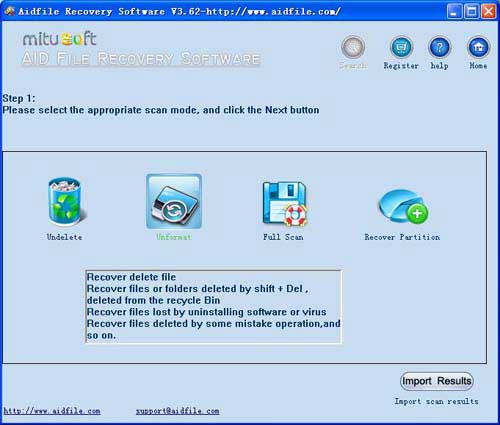
Use "Unformat" mode to recover lost files, unformat hard drive quickly."Unformat" support Exfat,Fat32, NTFS.
2:
Change partition location or size for the format operation, the user can select the "full scan" or "fast recover partition " two functions, please refer to the following details about the "full scan" and "recover partition" introduced.
Use "Recover partition" mode to recover files if hard disk drive partitions changed or damaged or deleted.
3:
Use "Full Scan" to restore lost files if hard drive show as "raw" or recover files which can not be found with "unformat",retrieve files from raw partition,recover files of drive which are not NTFS,nor exfat,nor fat32.
"Full Scan" support deep and full scan lost data from partition.
As a user,whatever we tell you,whatever you want,just try it. If Aidfile can help you,we congratulate ,if not,just contact us.
After you format your hard disk drive, accidentally, will be missing many important files,for example:Word documents,pdf files,excel sheets,photos,videos, letters, statements, etc, If a drive is formatted, you can select the "Unformat" to scan. Also you could select "Full Scan" to find lost files by file type.or,you can select "Recover paritition" to scan if the partition size or partition position has changed by formatted hard disk drive.
Aidfile have a free edition for you recovering 1G files with no pay.Just free download and try it.
Aidfile Recovery Software Keyfeature
support FAT32 EXFAT and NTFS file system
Windows 11, Windows 10, Windows XP, Windows 7, Windows 8,Windows 8.1, Windows Vista, Windows 2003, 2008, 2012.
Support WD, Samsung, Sandisk, Toshiba, Seagate, HP, Lenovo,Maxtor,etc.
MS Office document (Word, Excel, PowerPoint, Outlook) types (doc, docx, ppt, pptx, xls, xlsx, pst, etc.),photos (JPG, PNG, ICON, TIF, BMP, RAF, CR2, etc.), videos and audios (MPG, MP4, MP3, MTS, M2TS, 3GP, AVI, MOV, RM, RMVB, etc.), compressed files (rar, zip, etc.), PE files (exe, dll, lib, etc.) and so on.