External hard drive recovery software helps you to recover data from external hard disk drive after formatting or delete. please download and free trial .
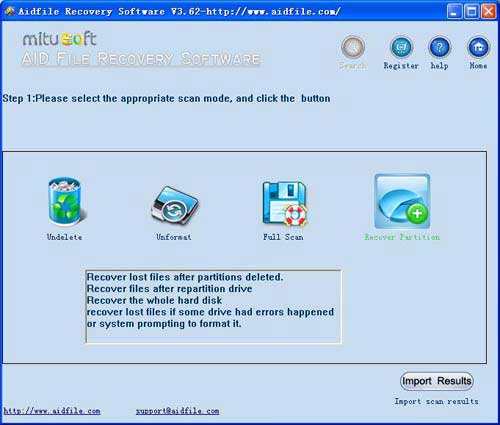
Use "Undelete" to recover deleted files from external hard drive.
Use "Unformat" to recover files from formatted external hard drive.
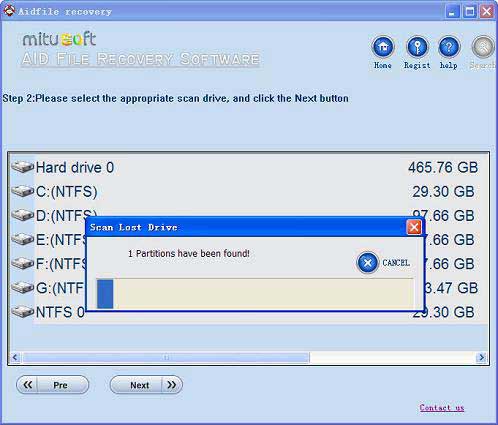
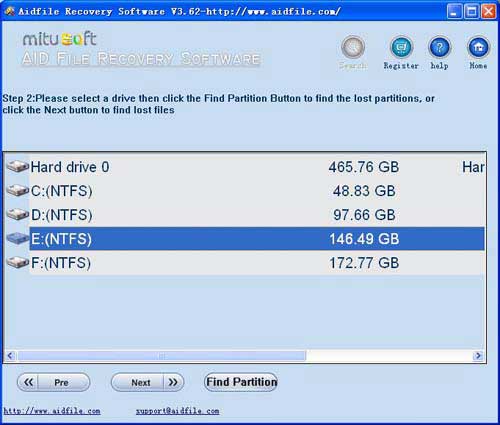
Use "Recover partition" to recover files if partitions changed or damaged or deleted.
Use "Full Scan" to recover lost files from raw partition, to recover lost files from hard drive if partitions show as "raw" or recover deleted files which can not be found with "undelete" and "unformat" and "recover partition".Support deep and full scan lost data from external hard disk.
Aidfile Recovery Software can help you
recover missing MS word excel, photos, music, videos,pdf and other all data from EXFAT/FAT32/NTFS .
Aidfile recovery software helps you to recover all missing files from lost, corrupted or formatted External Hard disk drive . Follow the steps, we can get data back.
The function of the external hard disk is as same as internal hard drive (or the normal hard disk). Although the drive is not as fast as internal models, an external hard drive still has a lot of advantages: it is portable and it can be operated on a plug-and-play basis, and users can back up or store important data separate from the main internal hard disk drive securely and safely.
Sometimes you may fail to access your external drive. You can see the drive using Windows Explorer, but it shows the drive as RAW with 0 bytes of data and 0 bytes of free space. As it stated above, the function of the external hard drive is as same as internal hard drive, so its construction is also similar with normal hard drive. That means it can be separated to be many partitions by writing partition information into partition table.
Here, a portable USB hard disk is a drive with rotating head and connecting to the computer HDD through USB interface. It shares the same recovery features with ordinary disk and USB flash disk, and yet has its own particularities. Compared with ordinary disk, the portable hard disk is not stable when connected to computers. If the drive has some minor flaws, then the USB disconnect automatically. This happens quite often when there are back tracks in the HDD. When copying the data, the hard disk gets disconnected automatically, and you cannot copy the data.
Aidfile recovery Software Keyfeature
support EXFAT and FAT32 and NTFS file system
support Windows 11 & Windows 10,2003,2008,2012,XP,Vista,Windows 7,Windows 8 ,Windows 8.1,Windows 2012
MS Office document (Word, Excel, PowerPoint, Outlook) types (doc, docx, ppt, pptx, xls, xlsx, pst, etc.),photos (JPG, PNG, ICON, TIF, BMP, RAF, CR2, etc.), videos and audios (MPG, MP4, MP3, MTS, M2TS, 3GP, AVI, MOV, RM, RMVB, etc.), compressed files (rar, zip, etc.), PE files (exe, dll, lib, etc.) and so on
Support WD, Samsung, Sandisk, Toshiba, Seagate, HP, Lenovo,Maxtor,Kingston,etc.